

Retail Website Migration: How Broken Product URLs Turn Into Lost Sales
Protect your revenue and preserve customer intent by ensuring that every old URL - from search results to in-store QR codes - connects seamlessly to its new destination. Avoid broken journeys and lost sales with strategic, semantic redirect mapping designed for complex retail migrations
Retail website migrations are typically linked to business objectives: improved performance, more accurate product data, market expansion, platform consolidation, or a redesigned customer experience. A launch may pass functional checks whilst still posing a significant redirect risk.
Legacy URLs continue to exist outside the new platform. They remain in search results, newsletters, SMS campaigns, paid advertisements, affiliate content, customer messages, catalogues, and in-store QR codes. Customers and search engines may continue to use those links long after the new site is operational.
When those links result in 404 pages, the issue becomes a commercial concern. Retail traffic often comes with pre-formed purchase intent: a customer has searched for a category, opened a product link, scanned a QR code, or followed a campaign URL. Should the destination fail, the retailer forfeits the visit precisely at the juncture where the customer anticipated the next step.
For retail and e-commerce teams, redirect planning forms part of revenue safeguarding. The objective is to ensure purchase intent remains connected to the correct destination following platform changes. RedirectifyAI was developed to address this challenge: creating a reliable legacy-to-new URL map before migration results in lost traffic, disrupted customer journeys, and extensive recovery efforts.
Why Retail Migrations Break Product URLs
Retail product URLs usually break because the new platform organises catalogue data differently. During a migration, teams often update product naming, category hierarchy, slug formats, language paths, and product identifiers. Even small changes in these rules can make old URLs invalid after launch.
A legacy store may use numeric product IDs in URLs. A new store may use readable slugs based on brand, model, colour, or category. The customer-facing structure becomes cleaner, while each product page receives a new address. The same issue occurs when a product moves into a new collection or when category names are updated during a taxonomy clean-up.
Catalogue restructuring adds even more variation. Retailers may merge similar categories, remove outdated sections, or split large categories into more specific groups. A product that used to sit under one path may appear under a different parent category after migration. The old page address then needs a relevant destination in the new catalogue.
Product lifecycle decisions create another layer of work. Some products continue unchanged. Others are replaced by newer models, bundled into collections, or removed because stock has ended. A redirect plan needs rules for each case so old URLs do not all receive the same generic destination.
Filtered and parameter-based URLs require special handling. Size, colour, brand, availability, and sorting options can create large numbers of URL variants. Some of these links may deserve individual mapping, especially when they were used in campaigns or indexed by search engines. Many filter combinations should be handled by the new platform logic because listing every possible URL would create unnecessary scale and maintenance issues.
This is why retail migration planning must start with URL types in addition to URL volume. Product pages, categories, filters, and promotional landing pages follow different rules. Treating them as one list makes the migration harder to review and easier to misconfigure.
The Commercial Risk: Category Pages and Product Pages Fulfil Distinct Functions
A retail migration plan should treat category pages and product pages separately. They support different types of demand, and each one creates a different risk when URLs break.
Category pages often collect broad commercial searches. A customer may search for “women’s running shoes,” “winter jackets,” or “coffee machines” before choosing a specific model. In that moment, the category page acts as the entry point into the catalogue. It gives the customer a product range, filters, prices, and stock options.
When a category URL disappears, the damage can spread across many search queries at once. A single broken category can affect traffic for product types, brands, seasonal needs, and local search patterns. Recovery also takes time because search engines need to process the new URL structure and rebuild trust around the new destination.
Product pages have a different type of value. These URLs often capture customers who already know what they want. They may come through Google, a saved link, a product review, a chat message, or an old campaign. If the product still exists, the old URL should lead to the matching product page. If the product was retired, the destination needs a relevant replacement or parent category.
A poor redirect choice creates friction at the point of intent. Sending a specific shoe model to a generic homepage does not answer the customer’s need. The visitor must search again, compare again, and decide again. Many will leave before that happens.
Retail migrations protect revenue when redirects preserve intent. Broad category demand should reach the closest category. Specific product demand should reach the same product, a close replacement, or a category that helps the customer continue the purchase journey.
Offline Links: QR Codes, Banners, Catalogues, and Store Materials
Retail websites do not live only in search engines. Store materials, printed catalogues, shelf labels, discount cards, partner campaigns, and QR codes often point to online destinations.
A QR code is an encoded link. Once printed on a banner, coupon, brochure, or product display, it cannot be changed through the website admin. If the URL inside the code stops working after migration, the physical asset keeps sending customers to the wrong place.
This creates a specific retail risk. Store teams may continue using materials after a platform launch. Customers may scan old codes during seasonal campaigns or while comparing products in store. If the destination fails, the retailer loses both the visit and the offline-to-online connection.
The same issue applies to SMS campaigns, email links, affiliate content, and partner reviews. Some links are visible on the public site and can be found through crawling. Others exist outside the crawler’s reach. QR codes printed on store banners or coupons need to be added to the migration inventory manually, often through CSV input.
Campaign tracking can also suffer. If old QR links reach 404 pages, teams may misread campaign performance. The data may suggest that customers stopped scanning the code, while the real problem sits in the broken destination.
Redirect planning should include every link source that drives retail demand. Product and category URLs are usually the first priority, but offline and campaign links should be part of the same redirect plan. This is especially relevant for retailers with stores, catalogues, local promos, and long-running printed assets.

What Goes Wrong With Manual Redirect Mapping
Manual redirect mapping often commences with exports. Teams extract URLs from the CMS, review sitemap files, crawl visible pages, and compile a spreadsheet with old and new destinations. For smaller sites, this approach can be effective. However, large retail catalogues present a significantly different workload.
Even a few thousand URLs can necessitate days of review. Larger catalogues introduce product variants, discontinued items, category alterations, filtered listings, seasonal landing pages, and hidden campaign URLs. The task becomes repetitive, and most errors tend to emerge as the launch deadline approaches.
Overlooked URLs represent a common challenge. A page may no longer feature in the main navigation but could still receive traffic via search, newsletters, partner content, or QR codes. Should this page be absent from the redirect file, customers will encounter a 404 error post-launch.
Redirect loops pose another risk. One URL directs to a second URL, whilst the second subsequently points back to the first. The browser continues to follow this loop until the request ultimately fails. Redirect chains cause a related problem. A customer navigates through several redirects before reaching the final page, which impedes loading times and introduces technical overhead for search engines.
Homepage fallbacks are also prevalent during expedited migrations. When teams cannot identify a suitable match, they direct old URLs to the homepage. While this may appear secure within a spreadsheet, it fails to preserve customer intent. Search engines may regard large-scale homepage redirects as weak or irrelevant signals.
Semantic mismatch is the retail-specific manifestation of this same issue. A product page for shoes should not lead to scarves merely because the URL pattern appeared similar. The destination must be logically consistent based on content, category, and customer expectation.
How RedirectifyAI Helps Retail Teams Reduce the Risk
RedirectifyAI supports the redirect planning stage before a retail website goes live. It compares old and new URLs and helps build a structured 301 redirect map that can be reviewed before implementation.
The system can work with crawled website data or CSV input. Crawling is useful for public product pages, categories, collections, and landing pages. CSV input helps cover links that may sit outside the public website, such as QR codes, voucher links, SMS campaign URLs, or pages behind restricted access.
The matching process doesn’t use only the URL text. RedirectifyAI analyses the page title, meta description, main heading, and available page content. This creates a semantic profile for each page, helping the system understand what the page represents. A product page can then be matched by meaning, even if the URL structure changed during migration.
This matters in retail because many old pages do not have perfect one-to-one replacements. Some products no longer exist in the new catalogue, while category and campaign structures may change during the migration. In these cases, the goal is to find the most relevant destination so the customer journey can continue.
RedirectifyAI also helps reduce manual review load. The system suggests matches and highlights cases that need attention. SEO and delivery teams can spend less time on mechanical URL comparison and more time reviewing low-confidence matches, high-value categories, and commercial exceptions.
For FlexMade projects, RedirectifyAI can be used as part of the wider migration process. The team can assess the scale of URL change during discovery, prepare the redirect map before launch, and review edge cases before the new site receives live traffic.
Broken Link Type → Business Risk → Better Redirect Target
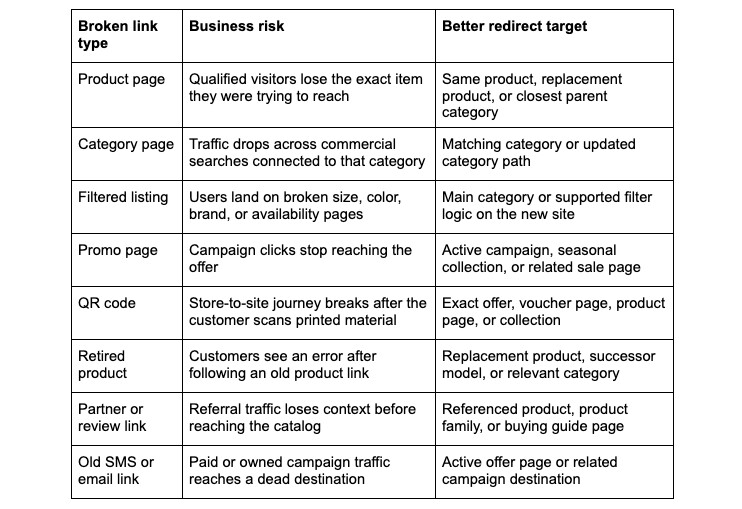
Homepage redirects should be used with care. They may keep the user on the domain, but they often remove the context of the original click. A customer who expected a specific product or offer should land on a page that helps them continue that journey.
Final Thoughts
Retail website migration affects every link that customers, search engines, partners, and store teams may still use after launch. Product and category URLs deserve close review, but the same discipline should apply to campaign links, QR codes, vouchers, and old promotional assets.
Broken redirects can turn existing demand into lost traffic and missed sales. They can also create recovery work after launch, when teams should be focused on stabilising the new platform and improving performance.
RedirectifyAI helps retail teams reduce this risk before migration goes live. By matching old and new pages through URL data, metadata, headings, and page content, it supports a cleaner redirect map and gives SEO teams a better starting point for review.
For retailers planning a platform move, redesign, catalogue restructure, or domain migration, redirect mapping should be treated as part of launch readiness. FlexMade uses RedirectifyAI to help clients protect customer journeys, preserve organic traffic, and reduce manual work during website migration.
Get in touch
- Telephone Number: +1 (425) 247-0867
- Email Address: [email protected]